Four Ways npm Malware Hides: From Obfuscation to Delayed Triggers
The attacker's core problem
When placing a malicious package in a public registry, the attacker faces one central tension: the package has to look normal enough to get installed, while doing something abnormal at some point.
Early poisoning was crude — a single curl line in the install script tarring up ~/.ssh and shipping it out, visible to the naked eye. As automated scanning became widespread, samples like that stopped surviving more than a few hours. So the techniques evolved, with one goal: postpone the moment of discovery.
The four approaches below are the most common today. They are frequently combined.
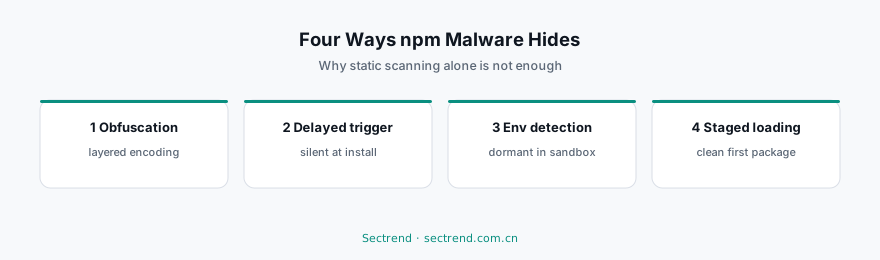
1. Obfuscation: unreadable to humans and machines
The most direct approach is making the malicious logic illegible. Common forms include layered base64 encoding, string arrays split and reassembled, eval with dynamic property access, and key strings broken into character-code arrays that are concatenated at runtime.
A typical sample may contain no visible http or exec anywhere in the source — those strings are assembled only at execution time.
Why static scanning misses it: Scanning based on signature strings or keyword matching is close to helpless against concatenation and encoding. And obfuscation by itself cannot be treated as malicious — plenty of legitimate minified build output is obfuscated too.
Signals that do work: obfuscation level inconsistent with the package's stated purpose (a small utility package does not need three layers of encoding), the combination of eval with dynamic string assembly, and build artifacts that do not match the source repository.
2. Delayed triggering: dormant at install time
The second approach stretches the timeline. The malicious code stays entirely silent at install, activating only after a number of days, on a specific date, or past a usage-count threshold.
This targets exactly the window in which automated review operates: most scanning happens shortly after publication, and manual review typically only observes install-time behavior. By the time it activates, the package is already in thousands of lockfiles.
Signals that do work: time-based conditions unrelated to the package's function, local state files written on first run for counting purposes, and network calls wrapped in deferred execution logic.
3. Environment detection: playing dead when observed
Going further, malicious packages actively determine whether they are being analyzed. Checks include: is this a CI environment (via environment variables), a container or VM, is a debugger attached, do the hostname and username match sandbox patterns, is egress traffic proxied.
Once it decides it is under analysis, the package behaves perfectly normally. This defeats dynamic sandbox analysis directly — the sandbox observes harmless behavior while something else happens on real developer machines.
Signals that do work: reading substantial environment information unrelated to functionality, comparison logic against known sandbox fingerprints, and behavior that differs across environments.
4. Staged loading: the first package is clean
The most evasive class: the published package is entirely harmless, and the malicious payload is fetched from a remote server at runtime.
The first version may genuinely be a working utility, accumulating downloads and trust. Some later minor release adds a line that “fetches updates from a configuration server” — from then on the malicious logic lives on the server, not in the package. The attacker can switch it on and off at will, target specific victims, and leave no sample to analyze.
Why this is the hardest: the static content of the package is always clean. You can audit the source a hundred times and find nothing, because the problem is not in the source.
Signals that do work: undeclared network requests at runtime, fetching and executing code from external sources, and request destinations with no relationship to the package's function.
Three layers of defense
No single measure handles all four. A combination is required:
Layer one: static and metadata review at intake. Beyond code scanning, metadata signals are often more effective — package age, maintainer history, anomalous jumps in the download curve, name similarity to popular packages, and recent changes to maintainer accounts. Many poisoned packages give themselves away in metadata before any code analysis begins.
Layer two: behavioral analysis. Install and run in a controlled environment, observing file access, process creation and network connections. Against environment detection, the analysis environment has to resemble a real developer machine as closely as possible — an ongoing arms race in itself.
Layer three: egress monitoring. This is the backstop, and the most effective layer against staged loading. However deeply the malicious code hides, it eventually has to send data out. Egress allowlists in development and build environments turn “we are compromised” into “we were compromised but nothing left.”
Practical guidance for enterprises
Build an internal registry mirror first. Route all dependencies through it, paired with allowlisting and intake review. The payoff here is structural — it mitigates poisoning, dependency confusion and hallucinated packages at the same time.
Impose an observation period on newly introduced dependencies. A package published recently, with a download count still climbing, is worth waiting on before it enters production dependencies. Time is the cheapest filter available.
Watch lockfile changes. Dependency updates should be explicit decisions, not build-time accidents. Every lockfile change belongs in code review.
Preserve traceability. When a package is publicly flagged, you need to answer within minutes: which of our projects use it, at which versions, introduced when. This is exactly what a complete dependency inventory and continuous monitoring are for.
Poisoning will not stop, because the openness of public registries is precisely what makes the ecosystem thrive. What can change is how fast it is found and how far it spreads.
---
Further reading: Building an open source intake policy · Malicious package entries in our Open Source & SBOM Guide · CSSA daily security intelligence